Next Shield 3D Live Wallpaper1.06
Publisher Description
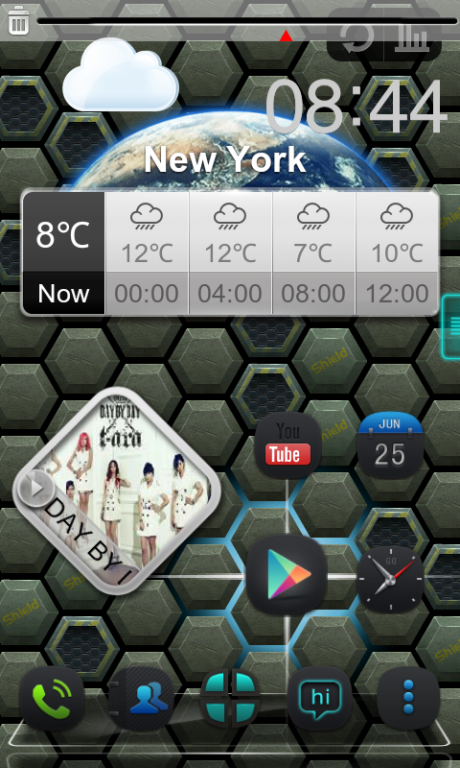
Next Shield 3D livewallpaper, designed for
Next Launcher 3D
specially, is released now. Its major features include:
--With Next Launcher--
Glare will follow your fingers, while you are sliding on the screen
Glare will focus around the icon which you are Pressing
Style of the live wallpaper and Next Launcher match perfectly
How to use:
General:Long press homescreen—>Wallpaper—>Live wallpaper—>Next Shield
With Next Launcher:Long press homescreen(Click 'Menu')—>Wallpaper—> Next live wallpaper—>Next Shield
Get the full version of Next shield live wallpaper, search and install 'Next Launcher' in Google Play.
Not all handsets support the live wallpaper feature, please check for a 'live wallpaper' category as the directions above state.
If you encounter any problems or have any suggestions for our Next Launcher, please do not hesitate to tell us. Thank you very much!
E-mail: nextlauncher@gmail.com
Facebook: www.facebook.com/NextLauncher
Google+: https://plus.google.com/108624381722454375934/posts
Not all handsets support the live wallpaper feature, please check for a 'live wallpaper' category as the directions above state.
About Next Shield 3D Live Wallpaper
The company that develops Next Shield 3D Live Wallpaper is Taptap Games. The latest version released by its developer is 1.06. This app was rated by 1 users of our site and has an average rating of 4.0.
To install Next Shield 3D Live Wallpaper on your Android device, just click the green Continue To App button above to start the installation process. The app is listed on our website since 2014-09-09 and was downloaded 76 times. We have already checked if the download link is safe, however for your own protection we recommend that you scan the downloaded app with your antivirus. Your antivirus may detect the Next Shield 3D Live Wallpaper as malware as malware if the download link to com.gtp.nextlauncher.liverpaper.spacestation is broken.
How to install Next Shield 3D Live Wallpaper on your Android device:
- Click on the Continue To App button on our website. This will redirect you to Google Play.
- Once the Next Shield 3D Live Wallpaper is shown in the Google Play listing of your Android device, you can start its download and installation. Tap on the Install button located below the search bar and to the right of the app icon.
- A pop-up window with the permissions required by Next Shield 3D Live Wallpaper will be shown. Click on Accept to continue the process.
- Next Shield 3D Live Wallpaper will be downloaded onto your device, displaying a progress. Once the download completes, the installation will start and you'll get a notification after the installation is finished.
Program Details
System requirements
Download information
Pricing
Version History
version 1.06
posted on 2014-09-09
V1.06,1.(Fix) Some FC bugs
version 1.0.1
posted on 2013-05-28
Several fixes and updates
